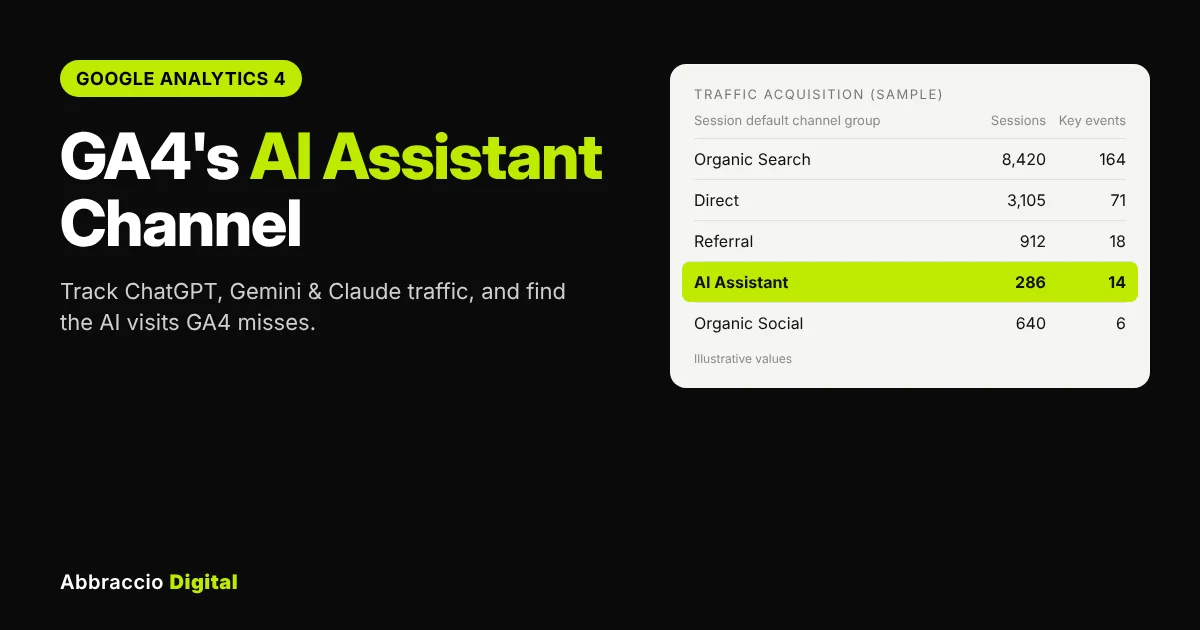
For two years, measuring AI traffic in Google Analytics meant hand-built regex filters and guesswork. In May 2026, Google changed that: GA4 now has a built-in AI Assistant channel that groups visits from tools like ChatGPT, Gemini and Claude automatically.
It’s a genuinely useful change, and it’s easy to misread. The channel doesn’t include Google’s own AI Overviews or AI Mode. It doesn’t recognise Perplexity. And it can’t see AI visits that arrive without a referrer, which is a lot of them. Report the number without those caveats and you’ll undercount AI’s real impact.
This guide explains exactly what the AI Assistant channel counts, where to find it, what it misses, how to build a custom channel group that fills the gaps, and how to turn it all into a monthly AI traffic report your boss or client will understand.
Quick answer
What is GA4’s AI Assistant channel? It’s a default channel GA4 added in May 2026. When a visit’s referrer is recognised as an AI chatbot such as ChatGPT, Gemini or Claude, GA4 sets the medium to “ai-assistant” and groups the session under AI Assistant in the Default Channel Group. No setup is needed. It doesn’t include Google AI Overviews or AI Mode (counted as Organic Search), Perplexity (still Referral) or AI visits without a referrer (Direct).
What the AI Assistant channel is (and how it works)
Google added the channel in May 2026, as Search Engine Journal reported on 14 May. Here’s how it works:
|
Element
|
What GA4 does
|
|---|---|
|
Detection
|
When a session's referrer is identified as an AI chatbot
|
|
Medium
|
Sets session medium to ai-assistant
|
|
Campaign
|
Uses a reserved campaign label, (ai-assistant)
|
|
Channel
|
Groups the session under AI Assistant in Default Channel Group reports
|
|
Named examples
|
ChatGPT, Gemini and Claude
|
|
Full source list
|
Not published by Google
|
|
Setup needed
|
None; it's automatic in every GA4 property
|
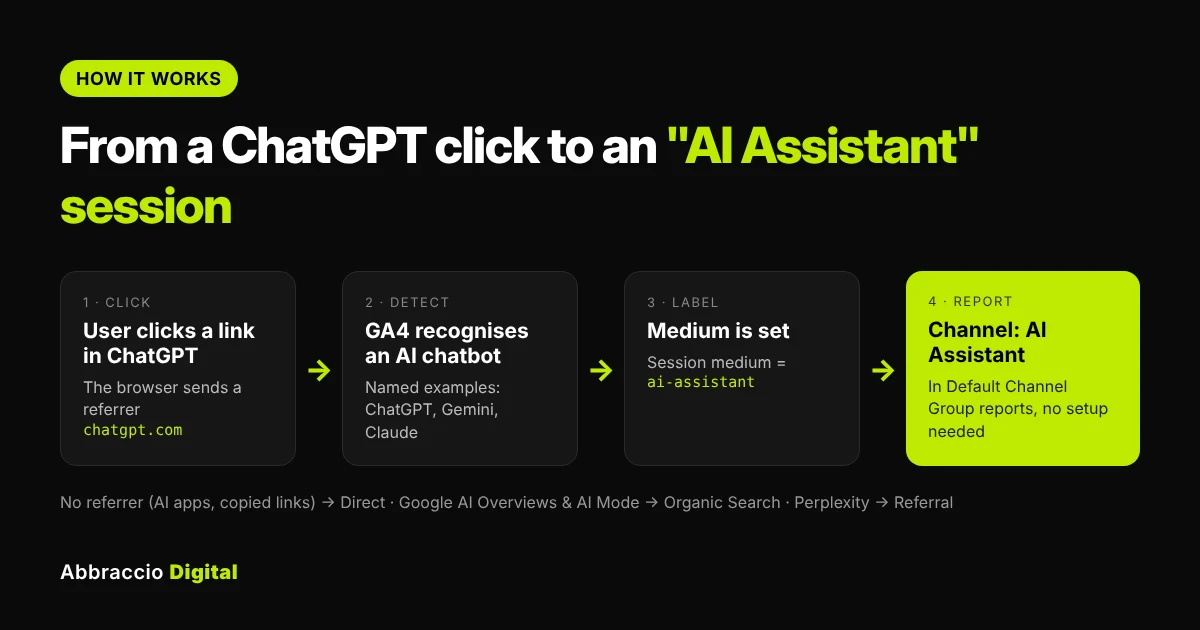
Two details matter for reporting. First, the channel only counts from the date it rolled out to your property, so month-on-month comparisons across the launch date will show an artificial jump. Second, because Google hasn’t published the full list of recognised assistants, you should check your Referral report for AI sources the channel doesn’t catch (more on that below).
Where to find AI Assistant traffic in GA4
- Open Reports → Acquisition → Traffic acquisition.
- Make sure the table’s primary dimension is Session default channel group.
- Find the AI Assistant row. Its sessions, engagement rate, key events and revenue are your headline AI numbers.
- To see which assistant sent each visit, click the + next to the dimension and add Session source as a secondary dimension.
- To see which pages AI sends people to, open Reports → Engagement → Landing page and add a filter: Session default channel group exactly matches AI Assistant.
Use a date range that starts after the channel appeared in your property; before that, the same visits sat in Referral.
Once your AI traffic is showing up in GA4, the next step is turning that data into a clear monthly report. Our free GEO reporting template lets you plug in your ChatGPT, Gemini, and Claude sessions alongside AI citations and visibility metrics.
What the AI Assistant channel misses
The channel is a floor, not a full count. According to Search Engine Journal’s analysis, five kinds of AI-influenced visits land somewhere else:
|
Missing traffic
|
Where GA4 puts it instead
|
What you can do
|
|---|---|---|
|
Google AI Overviews and AI Mode clicks
|
Organic Search
|
Nothing in GA4 separates them; Search Console counts them inside normal Web results too
|
|
Perplexity
|
Referral (not recognised by the channel)
|
Add it with a custom channel group
|
|
Other AI-source sessions without the ai-assistant medium
|
Referral, or Unassigned if the medium is missing
|
Custom channel group by source
|
|
AI mobile apps, in-app browsers and copied links
|
Direct (no referrer is sent)
|
Can't be recovered; use self-reported attribution
|
|
Visits before the channel rolled out
|
Referral
|
Use a custom channel group, which also applies to past data
|
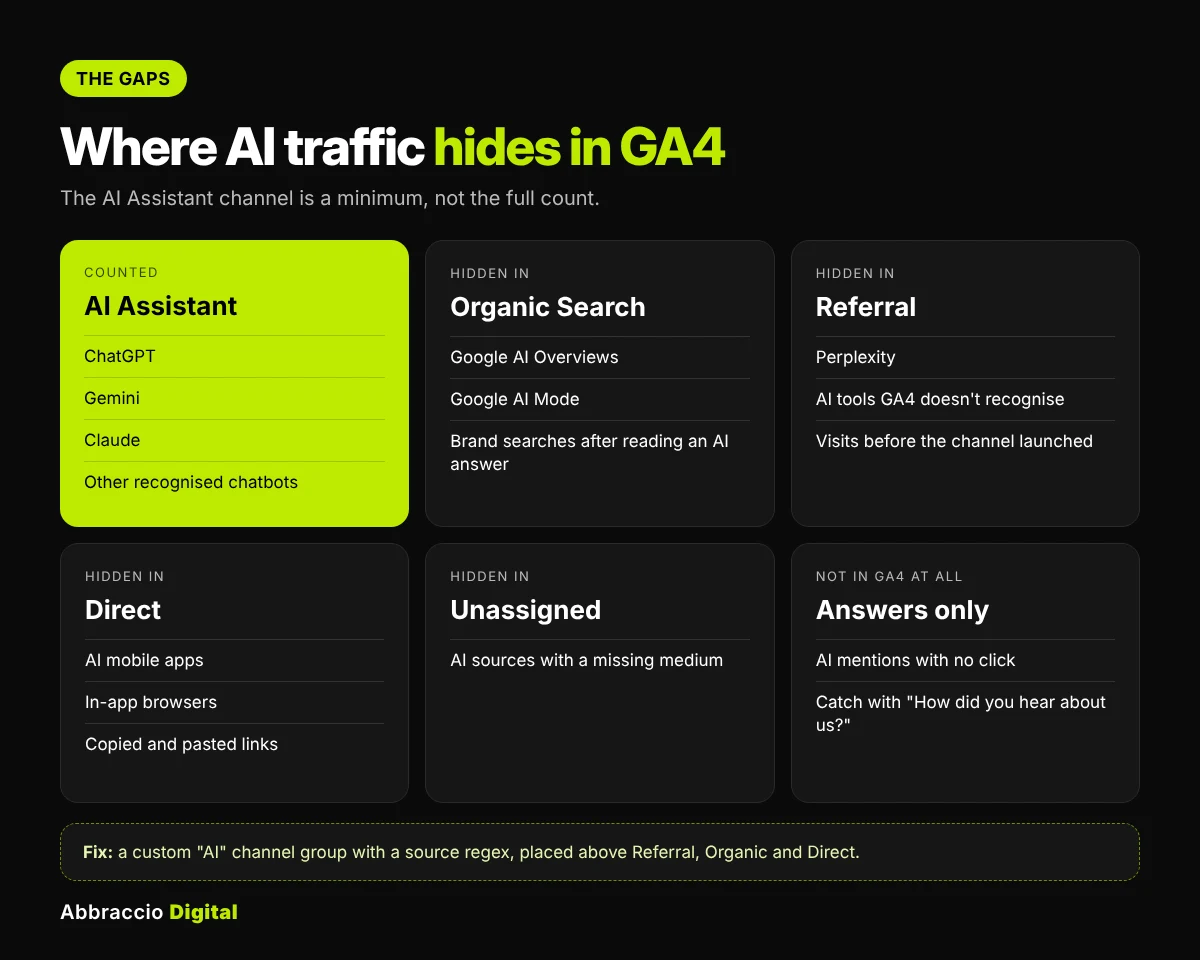
There’s also “dark” AI influence that never shows as a click at all: someone reads a ChatGPT answer, then searches your brand name on Google or types your URL. That visit counts as Organic Search or Direct. The only way to catch it is to ask: add “How did you hear about us?” with an “AI assistant (ChatGPT, Gemini, etc.)” option to your forms and checkout.
Fill the gaps: build a custom "AI" channel group
A custom channel group lets you count every recognisable AI source in one row, including Perplexity, without changing your raw data. It also applies to past data, because custom channel groups are applied when reports run.
- Go to Admin → Data display → Channel groups and click Create new channel group. Name it something like “Channels + AI”.
- Click Add new channel and name it AI.
- Set the condition to Session source → matches regex and paste:
.*(chatgpt\.com|openai\.com|perplexity|gemini\.google\.com|copilot\.microsoft\.com|claude\.ai|chat\.deepseek\.com|meta\.ai|grok\.com|chat\.mistral\.ai|you\.com).*
Add a second condition with OR: Session medium exactly matches
ai-assistant. This catches anything Google’s own detection finds.Drag the AI channel above Referral, Organic Search and Direct in the channel list. GA4 assigns each session to the first channel whose rules it matches, so order decides everything.
Save. In Traffic acquisition, switch the primary dimension to your new channel group.
Keep the regex specific. Don’t add bare words like gpt or google; they match unrelated sources. Check your Referral report every quarter for new AI tools and add their domains.
GA4 shows you how much traffic AI tools send, but not why some pages get cited and others don’t. To find those gaps, run an AI visibility audit and see where your brand shows up in ChatGPT, Gemini, and Claude answers.
Build a monthly AI traffic report
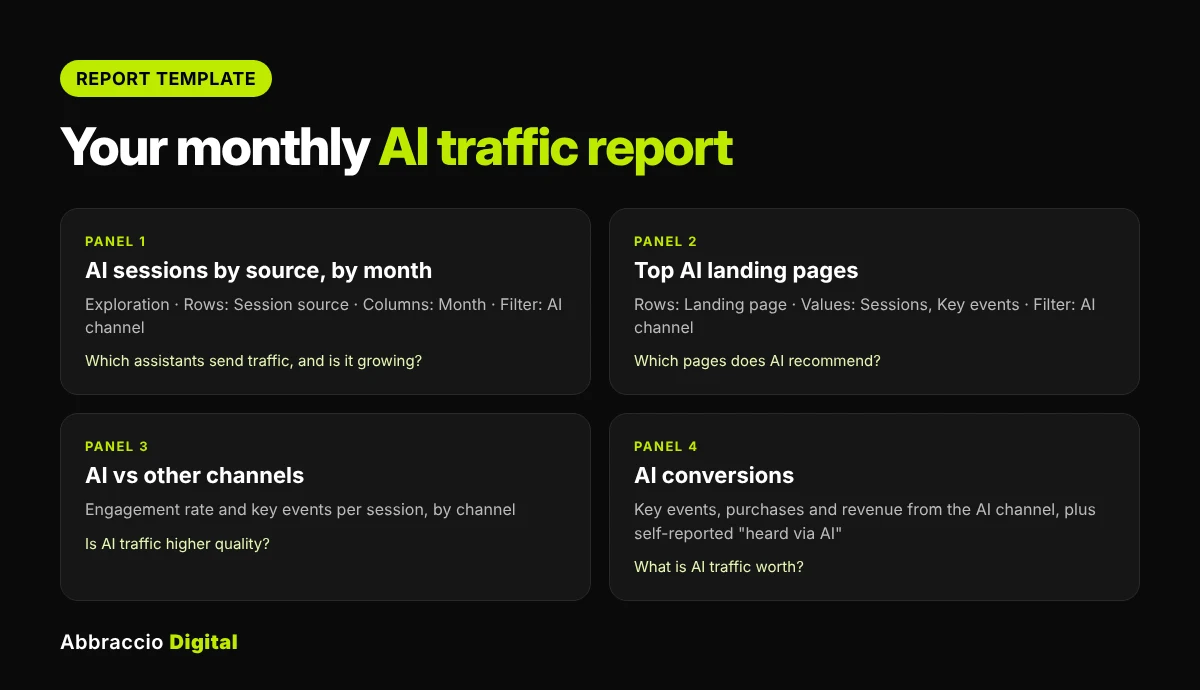
Once the channel group is in place, four views answer almost every question about AI traffic.
|
View
|
How to build it in GA4
|
The question it answers
|
|---|---|---|
|
AI sessions by source, by month
|
Exploration → Free form. Rows: Session source. Columns: Month. Filter: your AI channel. Values: Sessions, Engaged sessions
|
Which assistants send traffic, and is it growing?
|
|
Top AI landing pages
|
Exploration rows: Landing page + query string. Filter: AI channel. Values: Sessions, Key events
|
Which pages AI recommends; your "AI-proven" content
|
|
AI vs other channels
|
Traffic acquisition with your custom channel group. Compare engagement rate, key events per session, revenue
|
Is AI traffic higher or lower quality than search and social?
|
|
AI conversions
|
Key events or Ecommerce purchases, filtered to the AI channel
|
What AI traffic is worth in leads or revenue
|
Make it a dashboard. Looker Studio’s GA4 connector can pull all four views into one page. Use your custom channel group as a filter, and add Search Console data next to it so the report shows both organic and AI.
Report it honestly. Label AI sessions as “identifiable AI referrals (minimum)”. Add the self-reported “heard about us from AI” count beside it, and pair both with your monthly AI visibility metrics from the GEO reporting template. Traffic is the result; visibility is the leading indicator.
Tracking AI traffic is only half the picture. To get more visits from Google’s AI Mode in the first place, you need content that covers the hidden sub-queries it runs. Our guide to query fan-out SEO explains how.
How much AI traffic should you expect?
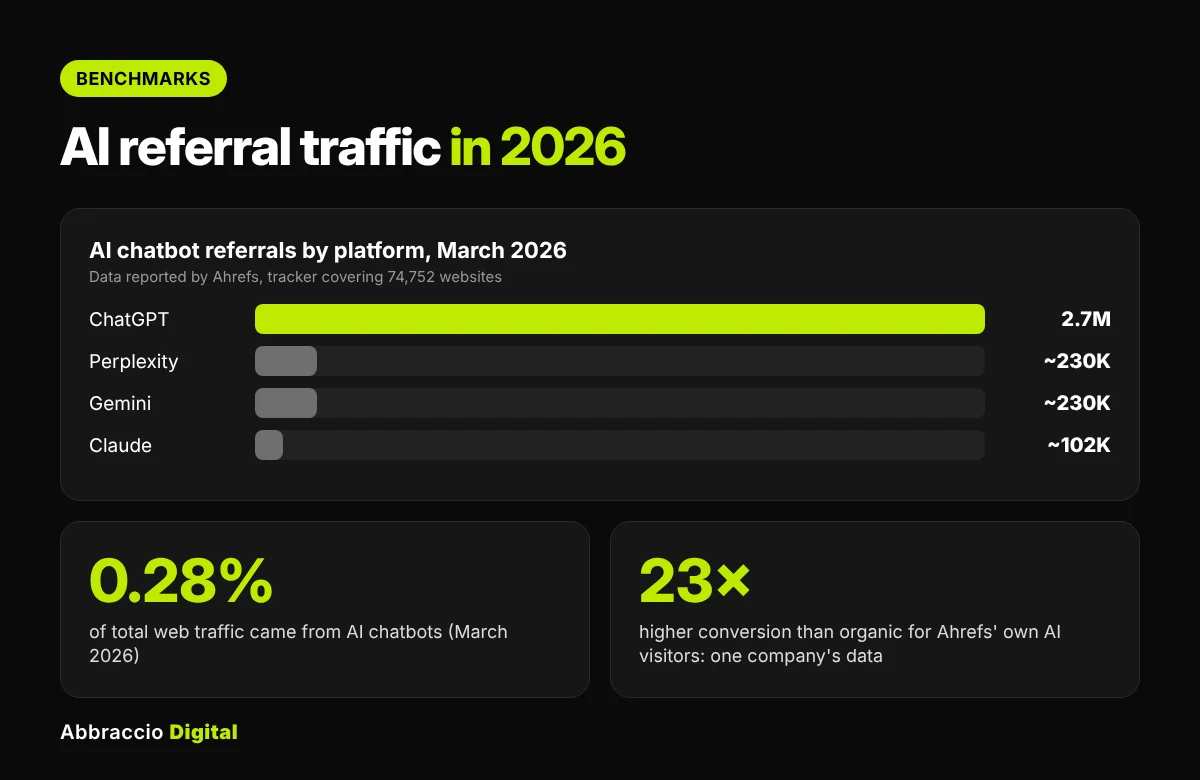
Less than the headlines suggest, but often worth more per visit. Ahrefs’ May 2026 analysis, using referral data from a tracker covering 74,752 websites, found:
|
Finding
|
Figure
|
|---|---|
|
AI chatbots' share of total web traffic (March 2026)
|
0.28%
|
|
ChatGPT's share of AI chatbot referrals
|
About 77% (2.7M of 3.5M visits)
|
|
Perplexity and Gemini
|
About 230,000 visits each
|
|
Claude
|
About 102,000 visits
|
On conversion, the evidence is promising but comes from individual companies, not broad studies. Ahrefs reported that AI search visitors were 0.5% of its visitors but drove 12.1% of its signups, a conversion rate 23 times higher than organic search. Buffer reported LLM-driven traffic converting 185% higher than organic, according to the same article.
Treat these as signals, not targets. Your own AI traffic share and conversion rate will depend on your category, how often AI recommends you and what you sell. The useful benchmark is your own trend, month on month.
GA4 only records human visitors who click through from AI tools. It can’t see the bots that crawl your site, because those bots don’t run JavaScript. To see how GPTBot, ClaudeBot and PerplexityBot actually access your pages, read our guide to AI crawler log file analysis.
Common mistakes and how to fix them
|
Mistake
|
What goes wrong
|
Fix
|
|---|---|---|
|
Reporting AI Assistant sessions as "all AI traffic"
|
Undercounts: misses Perplexity, Google AI features and no-referrer visits
|
Call it a minimum; add the custom channel group and self-reported data
|
|
Comparing months across the rollout date
|
Shows a fake jump the month the channel appeared
|
Use the custom channel group for history, or start trends after rollout
|
|
Putting the AI channel below Referral in a custom group
|
Referral claims the sessions first and AI shows zero
|
Drag AI above Referral, Organic Search and Direct
|
|
Over-broad regex (gpt, ai, google)
|
Unrelated sources get counted as AI
|
Use full domains and review quarterly
|
|
Excluding AI referrers as "spam"
|
Older guides told people to filter unknown referrers
|
Check referral exclusions and filters in Admin
|
|
Looking at sessions only
|
Misses whether AI traffic is valuable
|
Report engagement rate and key events per session too
|
Troubleshooting: no AI Assistant row at all? It may simply mean no recognised AI referrals in that date range. Check Traffic acquisition with Session source for chatgpt.com or perplexity; if they appear under Referral, use the custom channel group. Also confirm your GA4 tag fires on all pages, since a missing tag hides every channel.
Key takeaways
- GA4 added a default AI Assistant channel in May 2026: recognised AI chatbot referrals get the medium
ai-assistant, with no setup needed. - Google names ChatGPT, Gemini and Claude; it hasn’t published the full list.
- It misses Google AI Overviews and AI Mode (Organic Search), Perplexity (Referral) and AI visits with no referrer (Direct), so treat it as a minimum.
- Build a custom channel group with an AI source regex, placed above Referral, Organic and Direct, to catch more and apply it to past data.
- Report AI sessions, landing pages and key events monthly, alongside self-reported attribution and AI visibility metrics.
Conclusion
GA4’s AI Assistant channel finally gives every site a no-setup way to see traffic from ChatGPT, Gemini and Claude. Use it, but don’t stop there. Add a custom channel group to catch Perplexity and other tools, remember that Google’s own AI features sit inside Organic Search, and ask customers directly where they heard about you.
Put those numbers next to your AI visibility metrics every month, and you’ll have the clearest picture available of what AI search is doing for your business.
Sources
- Google Analytics adds AI Assistant as default channel group — Search Engine Journal, 14 May 2026
- GA4’s AI Assistant channel undercounts your AI traffic: how to build one that doesn’t — Search Engine Journal
- AI chatbot traffic: what it is, and how to get more — Ahrefs, 15 May 2026
Frequently Asked Questions
It’s a default channel GA4 added in May 2026. When a session’s referrer is recognised as an AI chatbot, GA4 sets the medium to “ai-assistant” and groups the session as AI Assistant in Default Channel Group reports.
No. Clicks from Google AI Overviews and AI Mode are counted as Organic Search, and Search Console reports them inside normal Web search results.
Not as of its launch reporting. Perplexity traffic stays in Referral, so add it to a custom channel group using a Session source regex.
AI chatbots still send a small share of web traffic, about 0.28% in March 2026 according to data reported by Ahrefs. GA4 also misses AI visits without a referrer, which land in Direct, and AI-influenced visits where people search your brand later.
Not for the default channel. To include Perplexity and other AI tools, create a custom channel group in Admin → Data display → Channel groups.
The default channel counts from when it rolled out to your property. Custom channel groups, by contrast, apply when reports run, so they also classify past sessions.