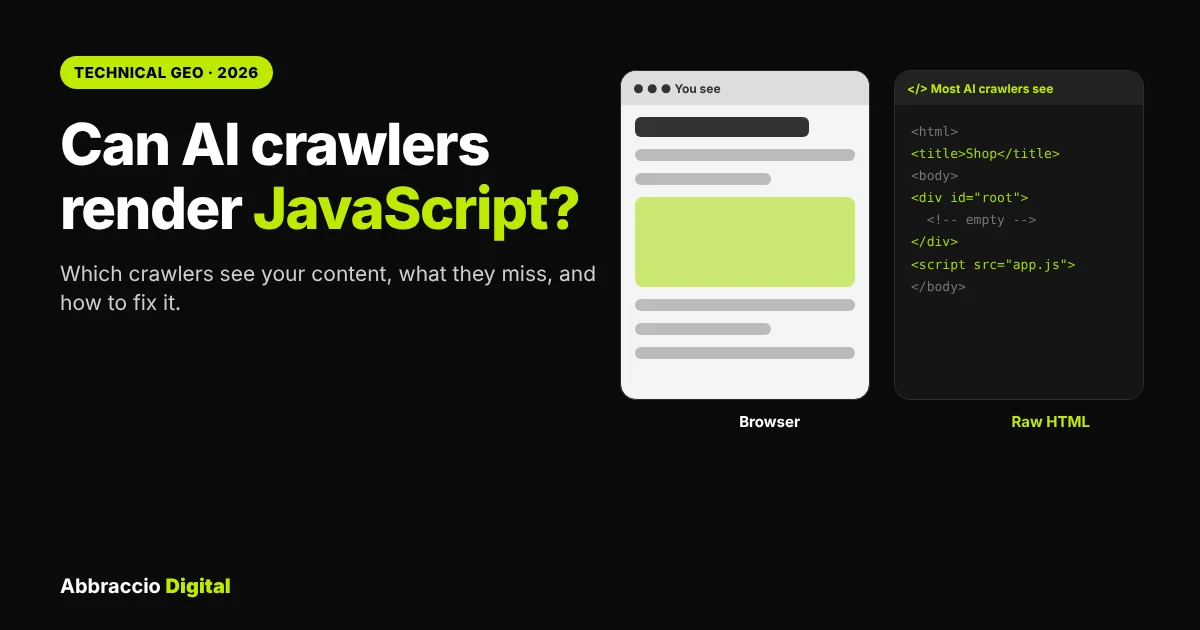
Open your website in a browser and you see everything: products, prices, reviews, FAQs. Now imagine a visitor who reads the page’s raw code but never runs any of its JavaScript. On many modern sites, that visitor sees a blank page with a title and a loading spinner.
That visitor is most AI crawlers. Vercel and MERJ studied crawler traffic across Vercel’s network and found that none of the major AI crawlers they examined rendered JavaScript, with two exceptions: Google’s Gemini, which runs on Googlebot’s infrastructure, and Applebot. OpenAI’s and Anthropic’s crawlers even downloaded JavaScript files, then didn’t run them.
So if your key content only appears after JavaScript runs, ChatGPT, Claude and Perplexity may never see it, however well you rank on Google.
This guide explains which AI crawlers render JavaScript in 2026, what they miss, how to test your own pages in ten minutes, and which fixes work for each framework.
Quick Answer
Can AI crawlers render JavaScript? Mostly no. Google’s crawlers (used for AI Overviews, AI Mode and Gemini) and Applebot render JavaScript. OpenAI’s, Anthropic’s and Perplexity’s crawlers have been documented reading only the raw HTML; a few 2026 log reports suggest OpenAI may be starting to render on some sites, but that’s unconfirmed. To be safe, make sure your main content, headings, prices, FAQs, links and structured data are in the HTML the server sends, using server-side rendering, static generation or prerendering. Test by comparing “view source” with the rendered page.
Why JavaScript matters for AI visibility now
For years, JavaScript SEO meant one question: can Googlebot render my site? Google answered that long ago: it renders pages in a recent version of Chrome, though rendering can be queued and delayed.
AI search changed the question, because your content is now read by many crawlers, and most of them are simpler than Googlebot.
|
What the Vercel/MERJ data showed
|
Number
|
|---|---|
|
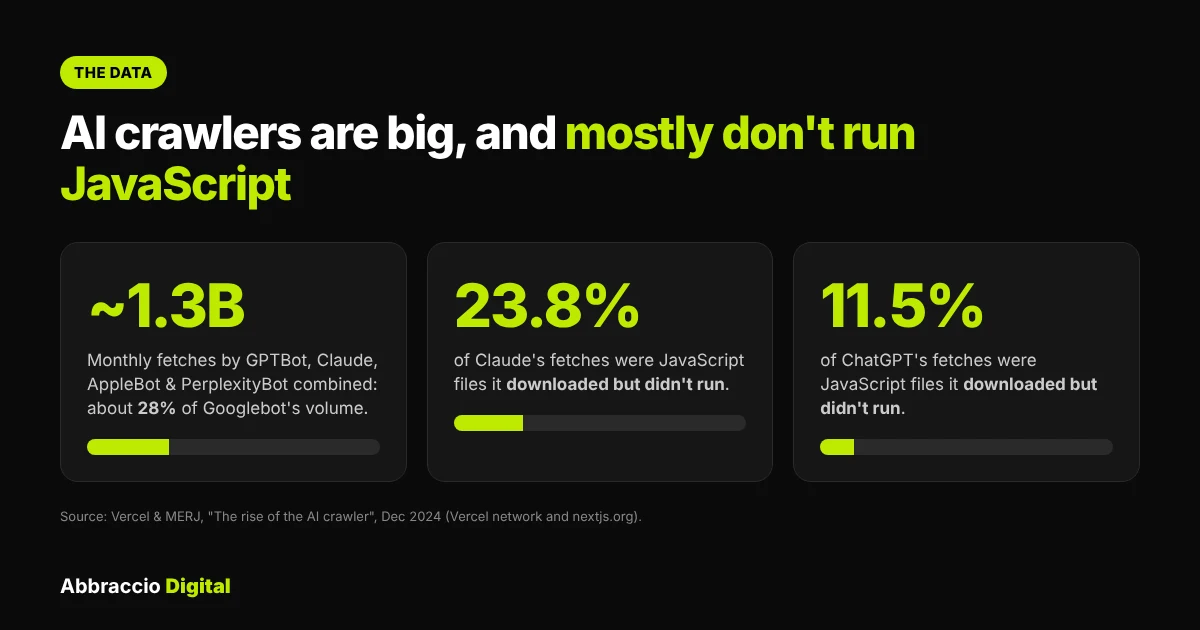
Monthly fetches by GPTBot, Claude, AppleBot and PerplexityBot combined, across Vercel's network
|
Nearly 1.3 billion, about 28% of Googlebot's volume
|
|
Share of ChatGPT's fetches that were JavaScript files it didn't run
|
11.5%
|
|
Share of Claude's fetches that were JavaScript files it didn't run
|
23.8%
|
|
Share of ChatGPT and Claude fetches that hit 404 pages
|
About 34–35% (Googlebot: 8.2%)
|
Source: Vercel, “The rise of the AI crawler”, December 2024. Data from Vercel’s network and nextjs.org.
The problem isn’t rare. In an October 2026 audit of 342 newly launched product websites, 10.8% had fewer than 50 words of body text in the raw HTML an AI crawler receives; most of those served an empty root <div> typical of client-rendered single-page apps. When the same pages were loaded in a real browser, most showed hundreds of words. Only 1 of 165 Next.js sites in the sample was thin, a sign that the framework’s default server rendering helps.
The takeaway: your site may look perfect to people and to Google while showing almost nothing to ChatGPT, Claude or Perplexity.
The best way to confirm what bots like GPTBot, ClaudeBot or PerplexityBot actually request on your site is to check your server logs. Our guide to AI crawler log file analysis walks you through spotting which pages they hit and which ones they skip.
Which AI crawlers render JavaScript?
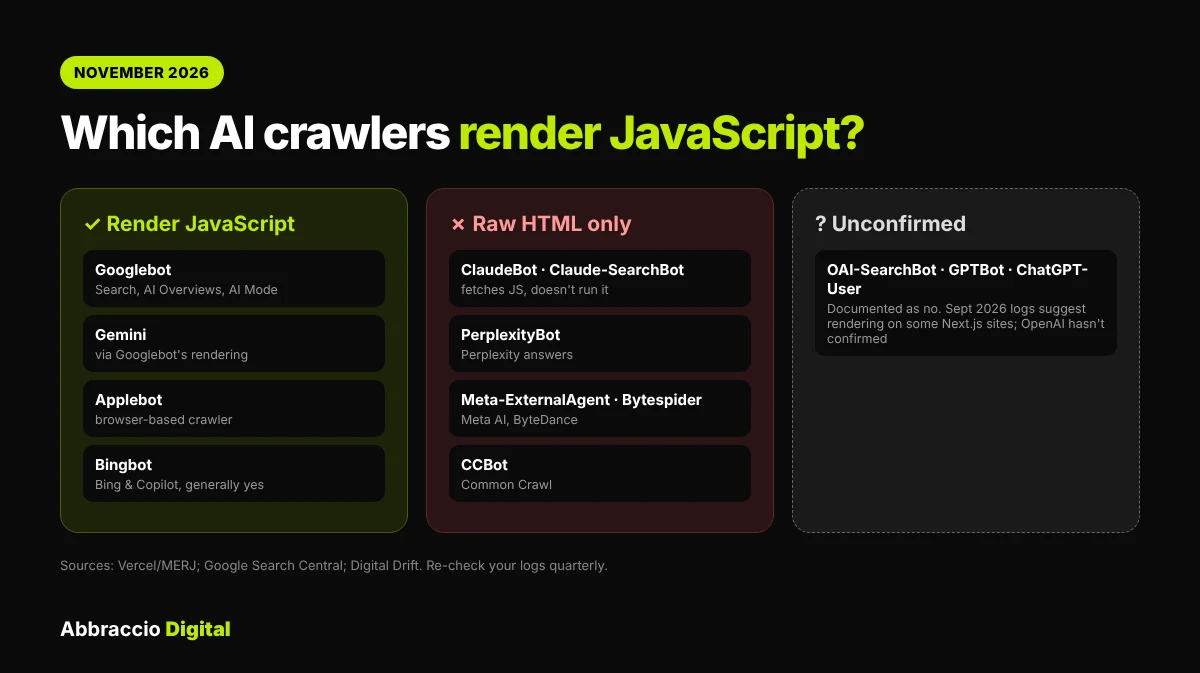
Here’s the crawler-by-crawler picture as of November 2026, based on published research and vendor behaviour. Crawlers change without notice, so re-check your own logs every quarter.
|
Crawler (user agent)
|
Used for
|
Renders JavaScript?
|
|---|---|---|
|
Googlebot
|
Google Search, AI Overviews, AI Mode
|
Yes, in a recent Chrome. Rendering can be delayed
|
|
Gemini (Google infrastructure)
|
Gemini answers
|
Yes, via Googlebot's rendering (Vercel/MERJ)
|
|
Applebot
|
Siri, Spotlight, Apple Intelligence
|
Yes, uses a browser-based crawler (Vercel/MERJ)
|
|
Bingbot
|
Bing, Microsoft Copilot
|
Generally yes, though key content is still safest in the HTML
|
|
OAI-SearchBot, GPTBot, ChatGPT-User
|
ChatGPT search, training, user-requested fetches
|
Documented as no. Some September 2026 logs suggest OpenAI may be rendering on some Next.js sites; OpenAI hasn't confirmed it
|
|
ClaudeBot, Claude-SearchBot, Claude-User
|
Claude training, search and user fetches
|
No (fetches JS files but doesn't run them)
|
|
PerplexityBot, Perplexity-User
|
Perplexity answers
|
No
|
|
Meta-ExternalAgent
|
Meta AI
|
No
|
|
Bytespider
|
ByteDance AI
|
No
|
|
CCBot
|
Common Crawl, used in many AI training sets
|
No
|
Sources: Vercel/MERJ, Google JavaScript SEO basics, Digital Drift on the OpenAI log reports.
What about the OpenAI reports? In late September 2026, one developer reported that OAI-SearchBot and GPTBot began making requests on his Next.js sites that only a rendering browser would make, from IPs matching OpenAI’s published ranges. It’s a single observation, OpenAI hasn’t announced a change, and it may involve rendering stored HTML later rather than live. Treat it as a sign of where things are heading, not a reason to stop server-rendering.
Our rule of thumb at Abbraccio Digital: if a piece of content matters for AI answers, it must be in the first HTML response. Plan for the simplest crawler, not the smartest.
What AI crawlers miss on JavaScript sites
A crawler that doesn’t run JavaScript only sees what’s in the HTML your server sends. Here’s what commonly goes missing, and why it hurts.
|
Element
|
Common JavaScript pattern
|
What a non-rendering AI crawler sees
|
Impact on AI answers
|
|---|---|---|---|
|
Main content
|
Single-page app fills an empty |
Nothing, or a loading message
|
Page can't be cited at all
|
|
Product prices and stock
|
Loaded from an API after page load
|
No price, or a placeholder
|
AI can't recommend you for "under ₹X" prompts
|
|
Reviews and ratings
|
Third-party review widget
|
No reviews
|
Weaker trust signals
|
|
FAQs and tabs
|
Accordions that fetch content when clicked
|
Questions without answers, or nothing
|
Lost answers to exactly the questions AI is asked
|
|
Internal links
|
No links to follow
|
Deeper pages never discovered
|
|
|
Structured data
|
JSON-LD injected by a tag manager
|
No schema
|
Lost product, FAQ and organisation facts
|
|
Meta title and description
|
Set by JavaScript after load
|
Default or template text
|
Wrong or generic page summary
|
|
Pagination and "load more"
|
Infinite scroll
|
Only the first batch
|
Most products or articles missing
|
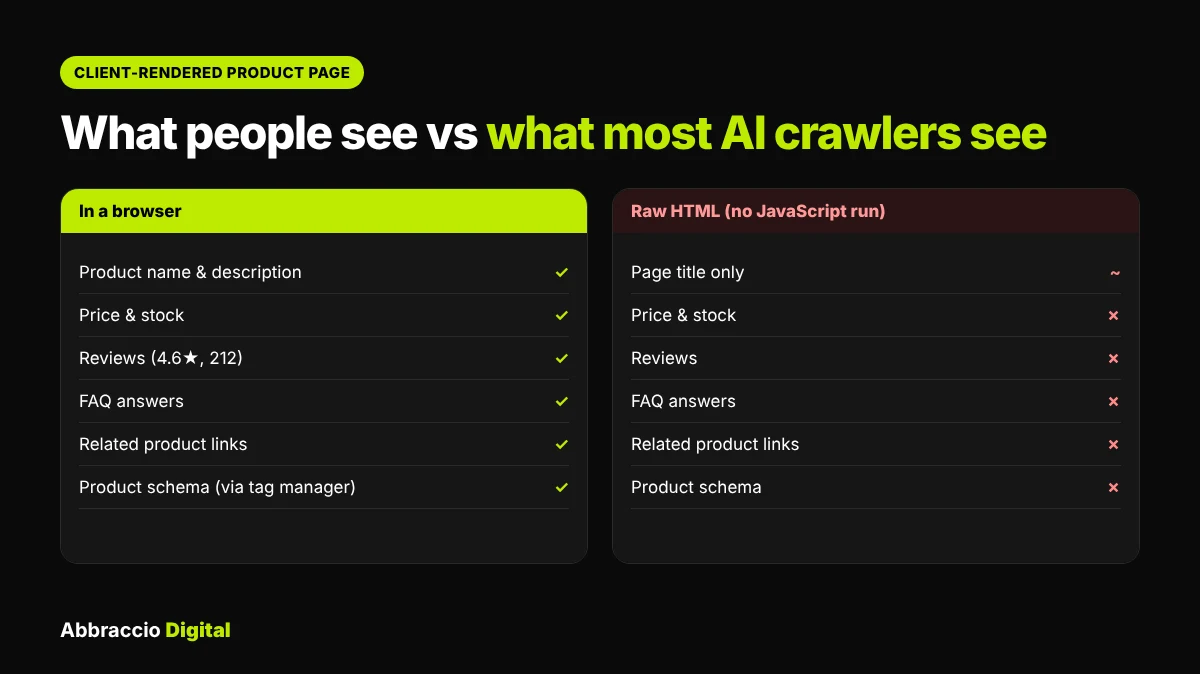
Watch the tag manager. Many sites add structured data, canonical tags or even FAQ content through Google Tag Manager. Google can often pick these up when it renders the page. Crawlers that don’t render won’t see them at all.
Google’s AI features use the same crawling and rendering setup as regular Search, so JavaScript is less of a risk there than with many third-party AI bots. For more on how Google approaches AI search, see our breakdown of Google’s official AI search guide.
How to test what AI crawlers see: 6 steps
You can test a page in about ten minutes. Start with your 10 most important URLs: home page, top category or service pages, top product pages and your best guides.
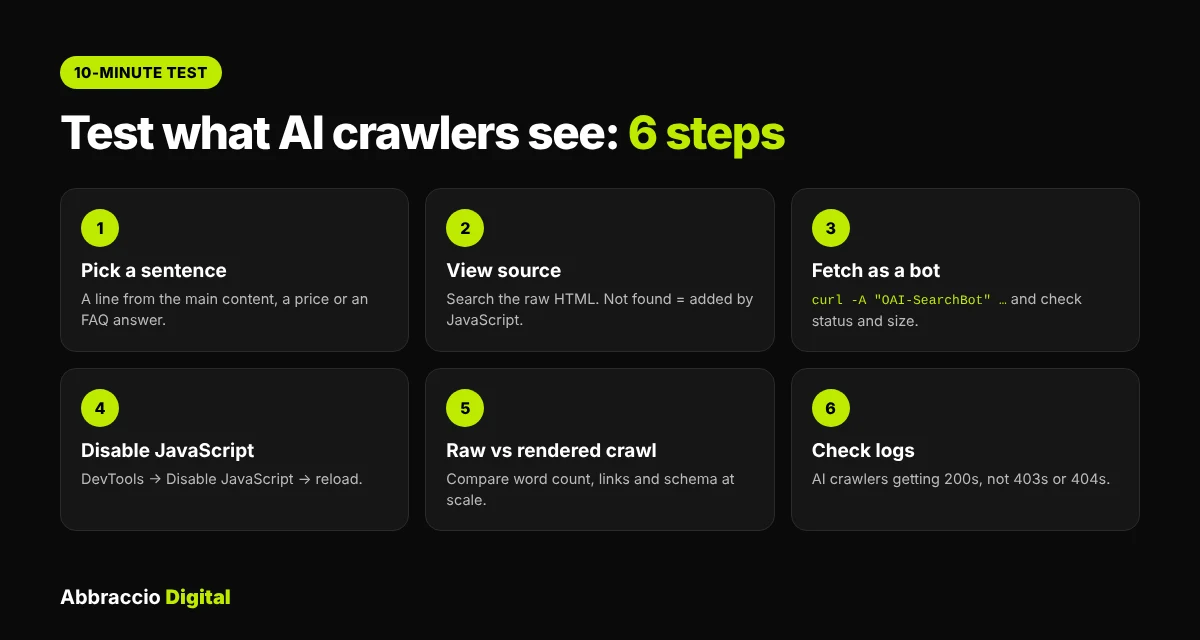
Step 1: Pick one sentence to look for
Choose a sentence that only appears in the page’s main content, such as the first line of a product description, a price, or an FAQ answer. You’ll search for it in each test.
Step 2: Check the raw HTML with “view source”
Open the page in Chrome, right-click and choose View page source (or add view-source: before the URL). Press Ctrl+F (Cmd+F on Mac) and search for your sentence.
- Found: the content is in the server HTML. AI crawlers can read it.
- Not found: it’s added by JavaScript. Non-rendering crawlers miss it.
Don’t use “Inspect element” for this: it shows the page after JavaScript runs.
Step 3: Fetch the page as an AI crawler
Run this in a terminal, replacing the URL and sentence:

A result of 0 means the sentence isn’t in the HTML that crawler receives. Also check the status code and page size; a 403 or a tiny page can mean your firewall or CDN is treating AI bots differently. Note that this fakes the user agent from your own IP, so a firewall that checks real crawler IPs may still behave differently.
Step 4: Turn JavaScript off in your browser
In Chrome DevTools, press Ctrl+Shift+P (Cmd+Shift+P on Mac), type Disable JavaScript and reload. What’s left is roughly what a non-rendering crawler sees. Check the main text, prices, FAQs, navigation links and images.
Step 5: Compare raw and rendered at scale
In Screaming Frog, crawl once in Text Only mode and once with JavaScript rendering, or use the JavaScript tab’s comparison columns. Look for pages where word count, links or structured data differ sharply between the two. For Google’s own view, use URL Inspection in Search Console.
Step 6: Check your logs
Confirm AI crawlers are actually reaching your pages and getting 200 responses, not 403s or 404s. Our AI crawler log file analysis guide has ready-made commands.
Record each result in the test kit download: it flags which pages need fixing first.
If key content only loads through JavaScript, AI tools may never see it, and you won’t know until your citations drop. That’s why it helps to regularly measure AI search visibility and spot pages that are invisible to AI crawlers.
How to fix it: rendering options compared
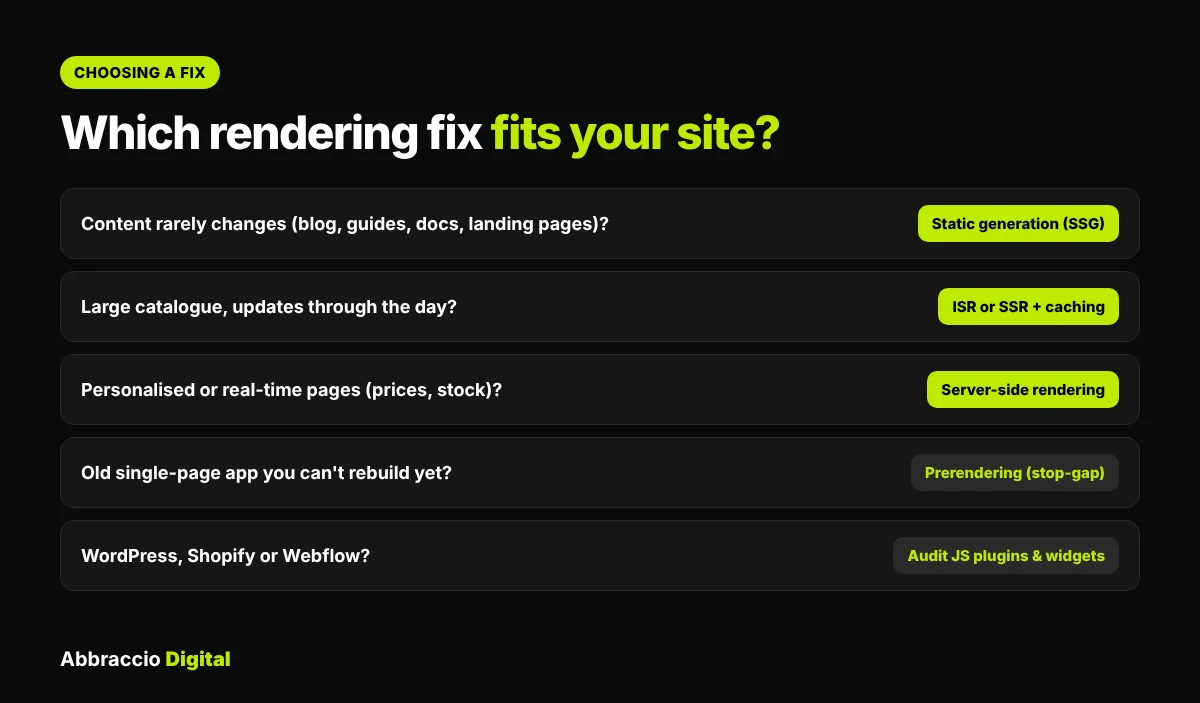
The goal is simple: the content that matters arrives in the first HTML response. Here are the main ways to get there.
|
Option
|
How it works
|
Best for
|
Watch out for
|
|---|---|---|---|
|
Server-side rendering (SSR)
|
The server builds full HTML for each request
|
Product, category and personalised pages that change often
|
Server load; make sure caching is set up
|
|
Static site generation (SSG)
|
HTML is built once at deploy time
|
Blogs, guides, docs, landing pages
|
Content changes need a rebuild (or incremental regeneration)
|
|
Incremental static regeneration (ISR)
|
Static pages rebuilt in the background on a schedule or on demand
|
Large catalogues with frequent updates
|
Stale pages between rebuilds
|
|
Prerendering service
|
A service renders pages in a headless browser and serves HTML to bots
|
Older single-page apps you can't rebuild yet
|
|
|
Hybrid / islands
|
Server HTML for content; JavaScript only for interactive parts
|
Most modern sites
|
Keep text out of client-only components
|
Indian rules matter here too: India’s Advertising Standards Council has influencer advertising guidelines that require paid or gifted content to be clearly labelled. Honest, disclosed coverage is safer and more durable.
By Framework
- Next.js: The App Router renders Server Components on the server by default. Keep key text out of components marked
"use client"that fetch data in the browser, and usegenerateMetadatafor titles and descriptions. - Nuxt (Vue): Server rendering is on by default (
ssr: true). Check that pages aren’t switched to client-only rendering in route rules. - Angular: Use Angular’s server-side rendering and prerendering support (Angular SSR) instead of a plain client-side build.
- React single-page apps (Vite, Create React App): Move to a framework with server rendering (Next.js, Remix/React Router, Astro) or prerender key routes at build time. Until then, a prerendering service is a stop-gap.
- Shopify, WordPress, Webflow: Core content is usually server-rendered. The risk is apps and plugins: review widgets, FAQ apps, product tabs and “load more” grids that inject content with JavaScript.
Quick wins that don't need a rebuild
- Put FAQ answers in the HTML and use
<details>/<summary>for accordions instead of fetching on click. - Use real
<a href>links for navigation and pagination. - Add JSON-LD structured data in the page template, not through a tag manager.
- Ask review providers for a server-rendered or static HTML option, or show a summary (rating, count, top reviews) in the HTML.
- Add a
<noscript>fallback with a short summary and links on critical client-rendered pages, as a temporary measure.
Not sure whether AI crawlers can actually see your key content? Our free AI visibility audit checks whether your pages are readable by bots like GPTBot and PerplexityBot, and flags anything hidden behind JavaScript.
JavaScript AI-readiness checklist
Use this for every important page template, not just individual pages.
Content in the HTML
- Main heading (
<h1>) and body text present in view source - Prices, stock and key product facts in the HTML
- FAQ questions and answers in the HTML
- Review summary (rating and count) in the HTML
- Unique
<title>and meta description set on the server
Links and structure
- Navigation, pagination and related links use
<a href> - No key content behind “load more” or infinite scroll only
- Structured data (JSON-LD) in the template, not injected by a tag manager
- Canonical tag in the server HTML
Access
- AI search crawlers allowed in robots.txt (if you want to appear in their answers)
- Firewall/CDN not returning
403or challenges to legitimate AI crawlers - Logs show
200responses for AI crawlers on key pages
Ongoing
- Raw vs rendered test added to your release checklist for new templates
- Quarterly re-check of crawler behaviour and your logs
For the full framework, read our guide to measuring AI search visibility.
This matters even more because AI search engines break one question into many sub-queries. If your FAQs, specs or comparison tables only load through JavaScript, AI crawlers may never see the content that answers them. Learn more in our guide to query fan-out SEO.
Key takeaways
- Most AI crawlers, including those from OpenAI, Anthropic and Perplexity, have been documented reading only raw HTML, not running JavaScript.
- Google’s crawlers (AI Overviews, AI Mode, Gemini) and Applebot do render JavaScript.
- Early, unconfirmed 2026 reports suggest OpenAI may be starting to render on some sites. Don’t rely on it.
- Client-rendered single-page apps are most at risk: AI crawlers may see an empty page.
- Commonly missed: prices, reviews, FAQ answers, links and structured data added by JavaScript or tag managers.
- Test with view source, a curl request with an AI user agent, JavaScript turned off, and a raw-vs-rendered crawl.
- Fix with server-side rendering, static generation or prerendering, and keep JavaScript for interactivity.
Frequently Asked Questions
OpenAI’s crawlers (OAI-SearchBot, GPTBot and ChatGPT-User) have been documented reading raw HTML without running JavaScript. Some developers reported signs of rendering on Next.js sites in September 2026, but OpenAI hasn’t confirmed any change. Keep key content in the server HTML.
Anthropic’s crawlers download JavaScript files but don’t run them, according to Vercel’s crawler study. Content that only appears after JavaScript runs is unlikely to be seen.
Yes, usually. AI Overviews and AI Mode use Google’s index, and Googlebot renders JavaScript in a recent version of Chrome. Rendering can be delayed, so server rendering still helps.
PerplexityBot has been documented as not rendering JavaScript. Serve important content in the HTML.
Not necessarily. If you use server rendering (Next.js, Nuxt, Remix, Astro) or prerendering, most content is in the HTML. Pure client-side single-page apps are the ones at risk. Test with view source.
It can work as a short-term fix for older single-page apps, but Google describes dynamic rendering as a workaround rather than a long-term solution. Server rendering or static generation is better.
No. llms.txt is a separate, optional file, and Google says its Search doesn’t use it. It doesn’t make content on your pages readable to crawlers that don’t run JavaScript.
Conclusion
JavaScript isn’t the enemy. It’s what makes modern sites fast and interactive. The problem is relying on it to deliver the content AI needs to read. Google can usually cope. Most other AI crawlers, so far, can’t.
The fix is a principle more than a tool: put everything that matters in the first HTML response, and use JavaScript to enhance it. Start by testing your top 10 pages today. If view source shows your content, you’re in good shape. If it shows an empty <div>, that’s the first thing to fix in your AI visibility plan.
Sources
- Vercel, Dec 2024 — The rise of the AI crawler (with MERJ)
- Google Search Central — Understand JavaScript SEO basics
- Google Search Central — Dynamic rendering as a workaround
- aat.ee, 28 Oct 2026 — Do AI crawlers render JavaScript? An audit of 342 launch sites
- Digital Drift, Oct 2026 — Do AI crawlers render JavaScript? The OpenAI signal